Instructors
Create instructor profiles and assign them to groups.
An instructor is a profile for a person who can be assigned to one or more groups. It stores the basic information presented in MARTA’s administrator area and, depending on the view configuration, on the website timetable.
An instructor profile is not a Joomla user account. Creating one does not grant access to the administrator area or give the person any additional permissions.
How do I open the Instructors list?
- Go to Components → MARTA.
- Select Instructors from the MARTA Dashboard.
The list contains the photograph, full name, short information, state and identifier. Search checks the first name, last name and short information. You can also filter the list by state and sort it by fields including last name or first name.
Creating an instructor
- Select New from the Instructors list.
- Enter the first name and last name.
- Add short information, a photograph and a fuller description if required.
- Set the state to Published if the profile should be available for use and presentation on the website.
- Select Save & Close or Save.
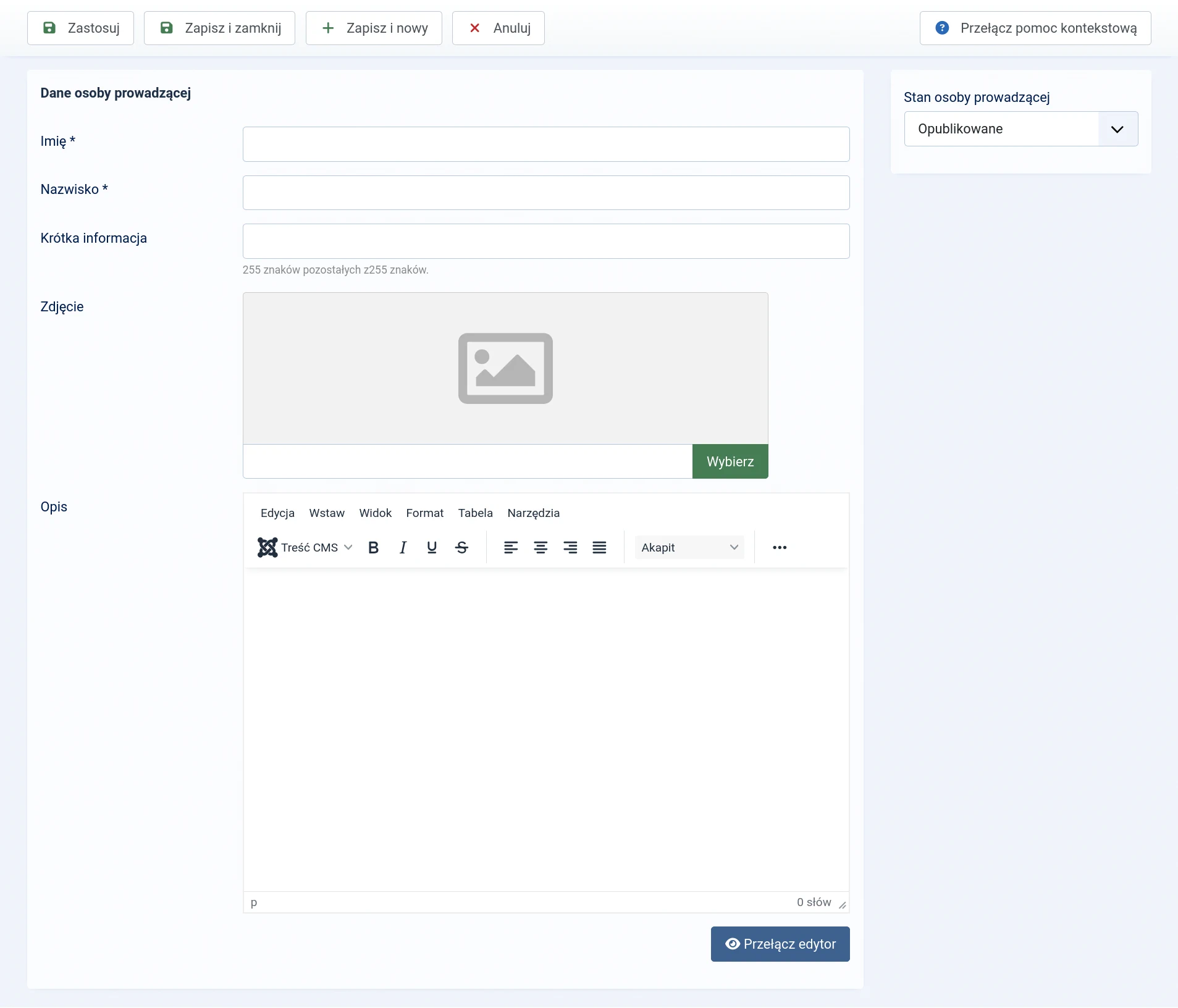
Form fields
- First name — required, up to 255 characters.
- Last name — required, up to 255 characters.
- Short information — optional text of up to 255 characters, such as the instructor’s specialism or role.
- Image — an optional image selected through Joomla’s Media Manager.
- Description — an optional, extended introduction to the person. The field supports formatted text.
- Instructor state — controls the profile’s availability in the administrator area and whether it can be presented on the website.
Short information should complement the person’s name rather than repeat the full description. Detailed experience, qualifications or information about their work is better placed in Description.
Photograph and public information
A photograph is not required. If you add one, use a current portrait with consistent framing and an optimised file size. The administrator list displays it as a small circular thumbnail, while the website may show a larger version.
Whether the photograph, short information and description appear on the website depends on the relevant view configuration and the profile being published. Omitting these details does not prevent the instructor from being assigned to a group.
Assigning instructors to groups
Instructors are assigned in the group form. One person can teach several groups, and several people can be added to one group.
Their order in the list is significant:
- the first person is the lead instructor;
- the remaining people are co-instructors.
You can change this order in the group form. The same person cannot be added to a single group more than once.
Important: Create and publish the instructor profile before assigning it to a group. Creating the profile alone does not automatically display the person on the timetable.
Instructor states
- Published — the profile can be selected for new assignments and, depending on the view configuration, presented on the website.
- Unpublished — the profile remains stored, but should not be used for new assignments or presented publicly.
- Archived — the profile is retained outside the current list and should not be used for new groups.
- Binned — the profile is waiting to be restored or permanently deleted.
If the person is temporarily not teaching, it is usually better to unpublish the profile than to delete it. This preserves existing relationships and allows the profile to be used again.
Deleting an instructor
The profile must first be moved to the bin. Select the Binned state in the list to access permanent deletion.
What next?
Once the instructors are ready, create the groups and assign the appropriate people to them.